Images are used widely on blogs and websites to improve their overall looks, they sure give some nice attraction but side by side they increase size of the page making your page heavy taking lot of time to load. Well but have you ever noticed that maybe few pixels from these images could be tweaked hence remove to save some size. This will overall help you in uploading more images and loading them on readers server, yes we can compress these image using RIOT.
RIOT is an awesome solution for compressing your images offline, you do not need to have any internet access to compress your images. Its desktop client is free to use and could compress a single image and even a bunch of them all together. S you can easily upload them without much bandwidth in use.
Using RIOT to Compress Images Lossless
RIOT is the best desktop image compressor tool which can be used on daily basis to compress your images which you are going to post on your blogs or compressing images of your family members which you are going to upload on Facebook or any other social networking service.
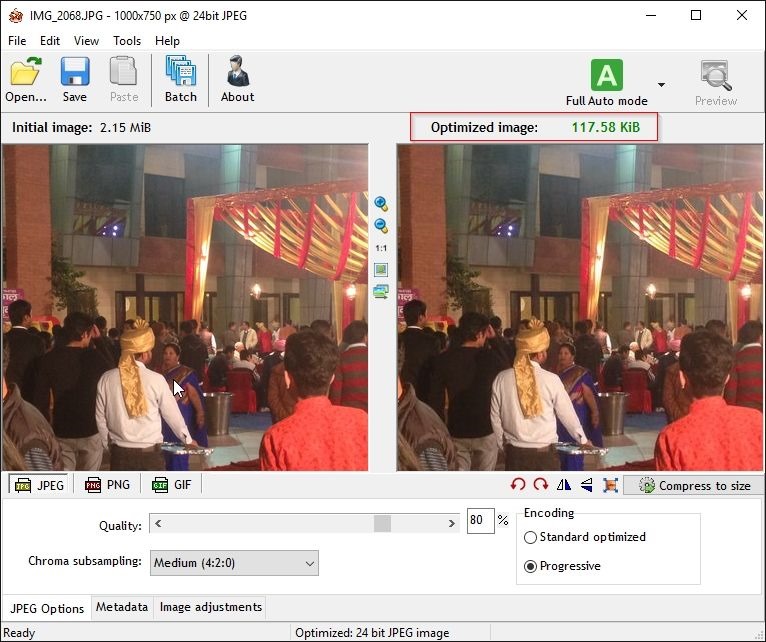
RIOT has every option which you can tweak if you feel the compression is much more and should be reduced, its has option for JPEG, GIF and PNG image so when you are going to compress an image make sure you choose the format first and than drag image to the lift window and instantly it will show you the optimized image, I have already highlighted the above image and outlined the size of original image and the optimized one.
- Improve Blogger Loading Speed using these Tips & Tricks
- Remove Default Widget Bundle CSS from Blogger Blogs
As you can see from above image, I just dragged a 2.15 MB image and it was converted to 117.58 KB that's really a huge difference. And the best part is everything is automatic, as the latest RIOT version provides you with an automatic detection feature that do all the magic itself.
So you can download RIOT from their official website they have two version one is standalone application installer which is for desktop and the other one is Plugin which can be combined with any great image editing software. Download the standalone version for desktop and install it. After you have successfully installed the software just drag your image and let it do the magic.