
So now just jump into below steps and start extending your free windows 7 trial period for approx. 1 year, have fun :)
- Simply install Genuine Trial version of Windows 7 without entering any Fake or Pirated Product/License Keys.
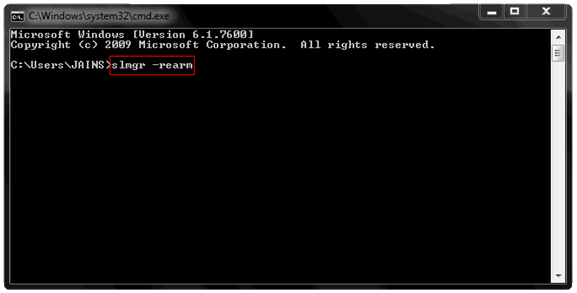
- Now when Windows is installed and trial is going to be over simply open CMD as an administrator and type
slmgr -rearmexactly into it and click enter. - Now after doing this something will Pop-up like command completed successfully restart system s restart the system and you will get 30 days back that’s purely genuine.
- Now This trick is valid only for 4 months means that you can run this command only 4 Times to get 30 days trial back, so we are going to mod this trial times and extend them to 8 times means valid 360 days genuine Windows 7 Trial pack.
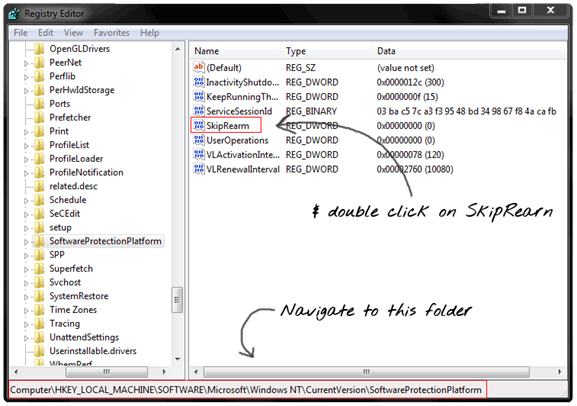
- So now go to RUN and type regedit to open the default Windows Registry Editor. After you have opened it you will see the registry editor having 5 main folder we are going to navigate to the specific folder and we are going to modify a value.
So you have to navigate to above folder as mentioned in the image and then double click on SkipRearm.
- Now you have to change the Value from
0to1to extend the times you can reset the Windows 7 Trial Pack like below image. - That’s it now simply click on OK and you are ready to go reset it as soon as trial is going to be over with
slmgr -rearmcommand make sure you open Command as an administrator.
So that's it guys now you can easily use the extending command everytime your trial is over, well if you face any problem do comment I will surely fix that out too.