Recently my dropbox account was temporarily disabled due to heavy traffic attack from different websites, as all were sharing my link's, so I started searching for some alternatives where I can host these small files and get direct download at the same time as dropbox was offering me. So I came across many website's like mediafire and other one's but I got my hold on Google Drive as I trusted the Google name so I started searching for some easy ways to get direct download link for Google Drive files.
Well I came across one easiest way that works well and will simply allow you to create direct download link for any file you upload on Google Drive, now let me remind you that you are going to get 5GB free space, so make sure your file's are small in size but if you are wishing to host files in bulk then you can even purchase a nice plan from them. So now lets jump in to the tutorial on creating direct download link's for files uploaded in Google Drive.
Make Direct Download Links for Google Drive File's
Now the reason we are going to use Google Drive is that it offers free 5GB space instead of 2Gb that is offered by dropbox and the second best one is that it offer's unlimited bandwidth, so anyone can download your files from different nation's and that too how many they wanted too. So let's see how it can be done.
- Open Google Drive Acc. & Sign In.
- Now upload file's to Google Drive.
- Now when the file is uploaded right click on it and Under Share click on Share.
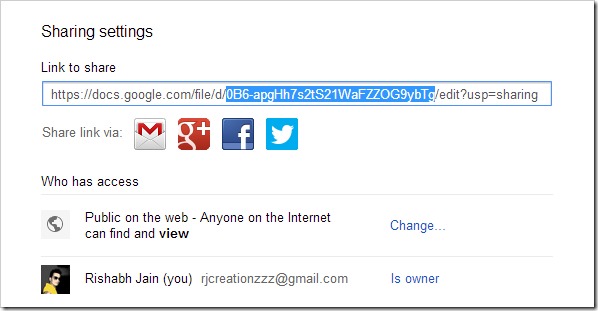
- Now you will see a pop-up window, just under Who has access ? option, choose Public (this is important as direct download only works if file is public)
- Now just copy the ID of that file like in the image below.
- Now replace below xxxxxxx with that ID you just copied.
https://docs.google.com/uc?id=xxxxxxxxxxxxxxx&export=download
- Now this is your direct download link for that Google Drive file.
So now you can shorten this big URL with any URL shortener I would recommend goo.gl or bit.ly and now you can share this small URL with anyone and as soon as he clicks on the links download will start right away. So now no matter how much bandwidth people access your links will be alive always.